Roost brings your school's parent community together.
The directory, class lists, carpools, clubs, and booster groups — all in one place, under one account that follows your family from elementary through high school. A modern alternative to DirectorySpot.


or explore a live demo — no signup →
Questions first? Email jeremy@roost.directory.
- Lake Oswego schools, K–12
- 6
- families
- Nearly 2,000
- students
- 2,700+
- parents and guardians
- 3,400+
Live at six Lake Oswego schools, elementary through high school: Forest Hills, Hallinan, Oak Creek, and Lake Grove Elementary, Lake Oswego Middle School, and Lake Oswego High School. Hundreds of families have kids at more than one of those schools on a single login. At Forest Hills, where we started, more than 80% of families have signed in, and not one family has opted out.
Sound familiar?
You don't know who can see what.
A vendor holds your families' phone numbers and addresses. They decide what's shared, what's private, and what happens to the data when you stop paying. Parents who'd rather opt out have to email the PTO to ask.
The directory only knows one kind of family.
"Where do I put my ex's address?" "My last name isn't the same as my kid's." "We have two moms — but the form only has slots for Mom and Dad." Directories built a decade ago assume every kid has one home, two parents, and matching last names. Anyone whose family doesn't look like that has to either lie to fit the boxes or skip the directory entirely.
Every September, everyone starts over.
Last year's directory is gone. Parents who opted in have to opt in again. The PTO board exports last year's spreadsheet, cleans it up by hand, and re-uploads. Kids moving up to middle school? Their parents create new accounts at the new school. Repeat every year, forever.
Half your families never opted in.
When the only way in is to opt in, most families never get around to it. The roster ends up half-empty, the parents who need it can't find anyone, and pretty soon nobody bothers opening it. A directory most of the school isn't in isn't really a directory.
One account, every school, every year.
Sign in once, and your account follows you. New school year? Same account. Kid moves from elementary to middle school? Same account, new school added. Second kid starts kindergarten while the first is in seventh grade? Same account, both schools, one login. Nothing to recreate, ever.
The school year just rolls over.
When a new year starts, Roost promotes every student a grade and graduates the top class in one pass. You review it before anything changes, and you can undo it. Nobody re-creates an account. Nobody re-opts-in. The directory you spent a year filling is still there in September.
And when families are ready to move up, Roost is built to carry them. A school can invite its rising students early over the summer — each family chooses to join the new school now or wait for the official roster, their call. A fifth grader can show as “Rising” at the middle school while they finish out elementary, then flip to active when the new roster lands. A kid who transfers mid-year shows as moved to their next school, instead of just disappearing.
Here's the part worth knowing: this gets better every time another school in your community joins. The more of your district is on Roost, the further the directory follows your families — up the grades and across buildings, same login, same neighbors, same teams. The opposite of starting from zero every fall. That's not theoretical for us. In Lake Oswego, Roost is live at four elementary schools, the middle school they feed into, and the high school after that. Hundreds of families already have kids at more than one of them, and every one of those families has a single login.
Privacy parents control — and a directory people actually use.
Opt-in directories die because signing up is a chore. Roost makes joining effortless: each family gets a magic link, confirms what's already there, and picks what to share — most are done in under a minute, no passwords, no forms. That's why more than 80% of families at Forest Hills, where we started, have signed in, with zero opt-outs.
And you're not locked into one model. Roost supports opt-in, opt-out, or a hybrid — whatever your school or district allows — so you can run the directory the way that actually fills it.
What “community” means changes as your kid grows up.
Most directories feel wrong by middle school because they were built for elementary and never grew up. Here's what actually changes — and why Roost is built for all of it.
Elementary: the classroom is the whole world.
One teacher, one room, the same 22 families at every drop-off. A class-by-class directory is exactly right — which is why Roost opens straight to your kid's class.
Middle school: the classroom disappears.
Six teachers, a locker, a different room every period, and your kid's first real activities. “Who's in your class?” stops meaning anything. Gravity shifts to teams and clubs — and a classroom-shaped directory can't keep up.
High school: the activities are the community.
The football parents are a community. The drama parents are a community. The Class of 2029 parents are a community. With 1,000+ students and dozens of groups, sports, and committees, the PTO barely operates at the school level — the real organizing happens in boosters, sport committees, and grade groups. Parents don't know each other from the building. They know each other from the activity.
That's why Roost has Clubs — a real home for boosters, teams, drama, and committees that anyone at the school can find and join. And it's why one account follows your family the whole way: same login from kindergarten through senior year, across every school your kids land in.
How it works
Schedule a 15-minute call.
We'll talk about your organization, look at your current directory, and figure out if Roost is the right fit. No commitment. No demo theater.
Prefer to look first? Explore the live demo — no signup, no salesperson.
We import your current directory.
Send us your DirectorySpot export, your spreadsheet, your old paper list — whatever you have. We clean it up, match families, and load it into Roost. You don't lift a finger.
Your board reviews and invites members.
Take a look at the imported data, fix anything that needs fixing, and decide who gets invited first. Most PTOs start with their board, then expand to the full roster a week later.
Members claim their info and choose their privacy.
Each family signs in with a magic link, confirms what's accurate, and picks what they want to share. No passwords. No forms to fill out. Most parents are done in under a minute.
Most directories let you export everything. We don't.
Once parent contact info is on someone's laptop, it's no longer protected by the directory's privacy settings. So Roost doesn't let anyone download the directory in bulk — not boards, not admins, not us.
Instead, we built the things people actually used bulk export for:
- Message your board or a whole class with one click. Roost generates a pre-filled email with everyone BCC'd — no copy-paste, no exposed addresses.
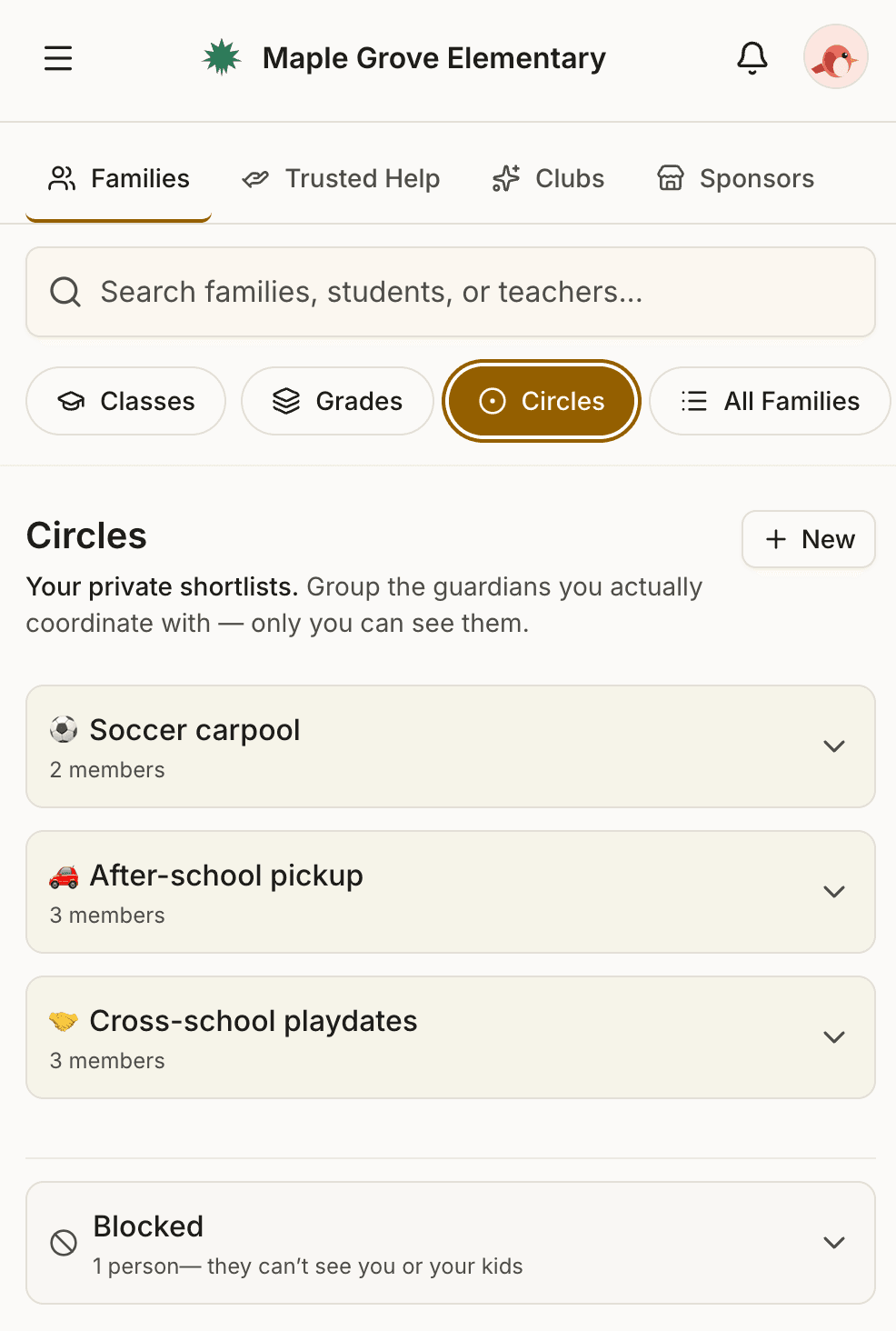
- Email a Circle you've made — your carpool, your room parents, the babysitter shortlist — with one click. The same one-tap email, scoped to exactly the people you choose.
Your data never leaves the app. That's not a feature. It's the whole point.
The tools your community runs on.
Roost starts as a directory you can trust. Then it does the everyday work that used to scatter across group texts, Facebook groups, and somebody's spreadsheet.
- Circles
- Private contact groups only you can see: your carpool, your room parents, the babysitter shortlist. Email everyone in one with a single tap.
- Shared circles
- Turn any circle into a shared one and everyone in it can see each other: a private mini-directory for your carpool, your kid's team, or the room parents. Invite by link or QR code. A shared circle can include families from other schools, or guests who aren't on Roost at all.
- Broadcasts
- Run your PTO's email from inside the directory: send to the whole school, a grade, a class, or a club, with no exposed addresses. Schedule ahead, route replies where you want, and let a room parent or club chair send under their own name. Send now or later, one click. See what a Roost newsletter looks like →
- Clubs
- Boosters, drama parents, robotics, class committees: the groups your school runs on get a real home anyone at the school can find and join.
- Volunteer matching
- Set up your committees and the roles you need filled, and Roost shows you the parents most likely to say yes. Message them in one tap, without ever seeing their contact info. Split any job into time-slots parents claim themselves.
- Trusted Help
- Sitters, tutors, coaches, and mentors from inside your community, vouched for by parents you already know. A family can extend their own listing to nearby schools in the district as they join Roost, each one badged to show the listing guardian's school.
- Sponsors
- Local-business sponsor cards your PTO sells and keeps 100% of, often enough to cover your whole Roost subscription. We don't take a cut of the sponsors you bring in, and we never touch the payment.
How Roost compares to DirectorySpot
We named DirectorySpot directly because it's the directory most PTOs are switching from. Here's the difference, in their words where we can quote them.
Every kind of family — built in.
Stepparents, two moms, shared custody, different last names. Each adult has their own account. Each kid can be linked to as many guardians and households as their real life requires — and the directory shows the right contact information to the right people.
DirectorySpot's own help docs say there are “2 options for handling multi-household families”. In one, Parent #2's info goes in a notes field that, per their docs, “is not searchable.” In the other, the child is “listed twice” on the class roster. Those are the two options.
Find anyone, fast.
Phonetic search across the whole directory. Type “Camdyn” and find Camden. Type “Westley” and find Wesley. One search box. One result list. No tabs to remember.
In DirectorySpot, search is scoped to whichever tab you're on. Students appear on the Families tab. Teachers appear on the Classroom tab. If you don't know which tab to search from, you don't find what you're looking for.
Two taps to your kid's class roster.
The first thing you see when you open Roost is your child's class, right at the top. One more tap and you're reading the roster, sending the teacher a message, or emailing the whole class with one click.
In DirectorySpot, the same trip is several taps deeper. Most parents give up before they get there.
Run a PTO board?
Roost runs the parts of your PTO that used to run you.
The directory, your email, your sponsors, your volunteer groups, in one place your board controls. Less to maintain every September, and a sponsor card or two can cover the whole subscription.
See how Roost makes it easier →Also works for...
Roost works for any community with a roster, not just schools. HOAs and school foundations especially, plus alumni associations, churches, and other groups whose membership shifts while the community stays.
If your organization has people and the people change over time, Roost probably fits. See pricing, or we're a 15-minute call away.
Ready to see what your directory could feel like?
Or email jeremy@roost.directory.